I actually forgot to apply the “smoothing” property to a flash.display.Bitmap display object being scaled inside Flash Player. Just look at the difference such an oversight made!
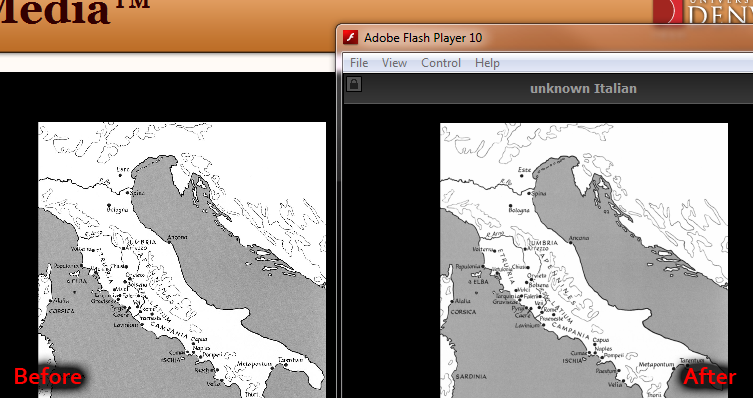
Since I was using a flash.display.Loader display object to load the image up, and Loader has no smoothing property, I totally spaced on this and it’s been out there for months rendering images in a pretty crappy way. I just needed to assign the image data to a Bitmap object and use that for display instead.
private function imageLoaded(e:Event):void {
    var imageBitmap:Bitmap = imageLoader.content as Bitmap;
    imageBitmap.smoothing = true;
    imageDrag.addChild(imageBitmap);
    //scale away!
}
Easy.
Learn from my blunder- always make sure to enable smoothing!
Good post, this seems to be an easy (but important) point to overlook. It’s worth noting that you can actually smooth loaded images in a single line:
Bitmap(myLoader.content).smoothing = true;
Neat. I love little shortcuts like that.
Thanks!! I was doing a scroller for a client which had Loaders embedded in an mc and couldn’t work out why turning the mc’s smoothing on didn’t smooth the images. This worked perfectly :)
Thanks for this tip; should be noted that you can use the loader as-is if you’re already attaching it. Just pull out the bitmap as described and set smoothing and it will affect the existing loader contents — exactly what I needed to do!